
How to Use Industry Opportunity Guides and a Paid Report
Use industry opportunity guides to map public-sector demand, test your company with a free scan, and decide whether a full action report is worthwhile.
Quick answer
The short answer
Public-sector demand follows different paths in healthcare, education, creative services, marketing and digital services, software, construction, energy, manufacturing, and community services. An industry opportunity guide helps you recognize the relevant agencies, funded organizations, procurement routes, and money flows. A scan tests those patterns against your company, and a full report organizes qualified signals into work your team can execute.
Key takeaways
- Use the industry guide to identify likely buyers, recipients, sources, and revenue motions.
- Test those patterns against your own offer, geography, eligibility, and capacity.
- Choose a full report when the additional evidence and action fields will save your team meaningful research and routing work.
Map the public-money routes in your industry
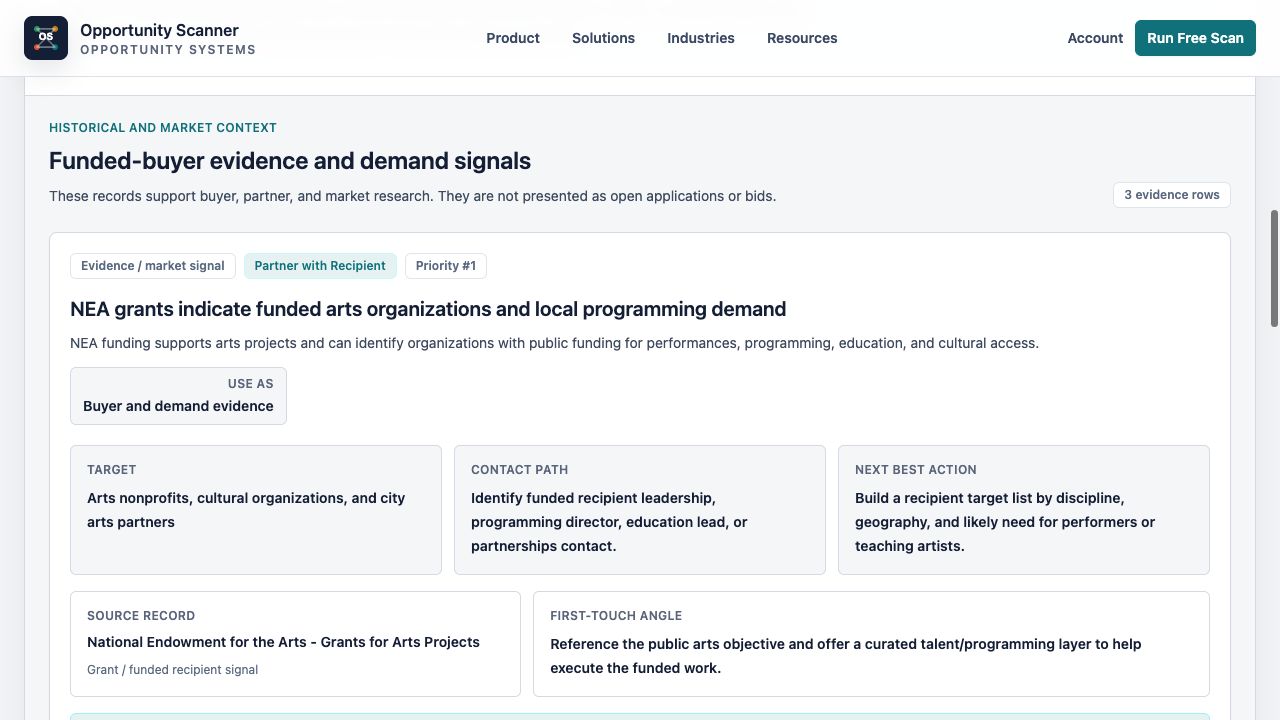
Start with how money and demand move in your market. Healthcare can involve VA procurement, state programs, funded providers, reimbursement, and distributors. Education can involve districts, workforce boards, grants, staffing, and vendor portals. Creative companies may find city events, arts funding, tourism, and recipient partnerships.
Your first opportunity may not be a direct bid or grant. An agency can buy from you, a funded organization can become a customer, a recipient can need a partner, a prime can need a supplier, or a developing policy can justify monitoring. The industry guide helps you see these routes before choosing one.
Use the language of the public need, not only the language on your website. A commercial product may map to a government workflow, program outcome, service gap, compliance need, equipment category, or delivery requirement that appears under a different name.
Know what each public source can prove
SAM.gov publishes federal contract opportunities, but the notice type and status determine whether a record is a solicitation, early market research, award notice, or other communication. Follow the official response instructions and listed contacts when a live notice controls the process.
USAspending shows historical awards, agencies, recipients, award types, and places of performance. It can reveal buying patterns, incumbents, and funded organizations, but an award record does not prove that new budget or a current purchase is available.
Grants.gov identifies forecasted, posted, closed, and archived funding opportunities, and the official notice controls eligibility. Acquisition.gov links to agency forecasts and vendor communication routes. Treat forecasts as planning evidence until an official posting confirms the opportunity.
Use a sample and free scan to test your fit
Review the industry sample closest to your business model. It should show how a source record becomes a target, revenue motion, contact path, caveat, and next action. Treat fictional company context and suggested actions as illustrations, not predicted results.
Then run a free scan using your company website. Check whether the returned targets are credible, the records are current, and the recommended motions match your offer, geography, eligibility, capacity, and timeline.
A limited or zero-match result can still improve your plan. It may point to a narrower offer, different buyer type, recipient or partner route, another geography, or a future monitoring date. Do not promote a weak row simply to keep the pipeline full.
Decide whether the full report saves meaningful work
The full report includes all qualified signals, target organizations, official source records, revenue motions, contact strategies, next best actions, CRM-ready notes, outreach angles, and workflow-ready data. It is useful when your team needs the complete research and routing layer, not simply more reading.
Contact strategy does not mean a personal email on every row. Agency opportunities may route through a notice contact, contracting office, program office, small-business office, or vendor portal. Enrichment can help with validated private recipients, primes, partners, and vendors when the relevant role is clear.
Before purchasing, decide whether your team can assign owners and follow through on qualified rows. The report creates the most value when its actions can move into an existing sales, partnerships, capture, or research workflow.
Work the report as an opportunity pipeline
Prioritize rows with credible source evidence, a clear target, realistic timing, and a revenue motion your company can execute. Reject records that fail eligibility, geography, capacity, scope, or deadline checks, and preserve the rejection reason for future searches.
Assign each retained row to one owner with one next step and due date. That action may be reviewing attachments, checking eligibility, registering as a vendor, researching a recipient, mapping a prime, drafting a capability statement, or monitoring a future posting.
Recheck active sources before outreach or submission because amendments can change dates and instructions. Keep historical evidence labeled as historical, and close rows when the source or fit no longer supports action.
Use explicit limits to make better decisions
A scan can identify source-backed patterns and recommend pursuit routes, but it cannot guarantee eligibility, available budget, a response, a meeting, or an award. Verify material requirements with the official source and qualified advisers when necessary.
Federal sources do not provide complete state and local coverage. Review the report's source-coverage note, retrieval dates, and caveats before deciding that no opportunity exists in a market.
The goal is a clearer market map and a smaller set of credible actions. Industry guidance helps you understand where to look; the report helps your team decide what to pursue, monitor, research, or reject.
Industry opportunity evaluation checklist
- 1Identify the public-money and procurement lanes relevant to your industry.
- 2Translate your offer into the buyer's program, workflow, or outcome language.
- 3Check what each official source proves and what it does not.
- 4Review the closest industry sample and its disclosures.
- 5Run a free scan against your actual website and offers.
- 6Check fit, geography, eligibility, capacity, timing, and disqualifiers.
- 7Compare the additional action fields in the full report with your team's needs.
- 8Use official routes first and enrich validated private targets selectively.
- 9Assign qualified rows to an owner, next action, and due date.
- 10Recheck live sources before outreach, response, or submission.
Charts and visual evidence
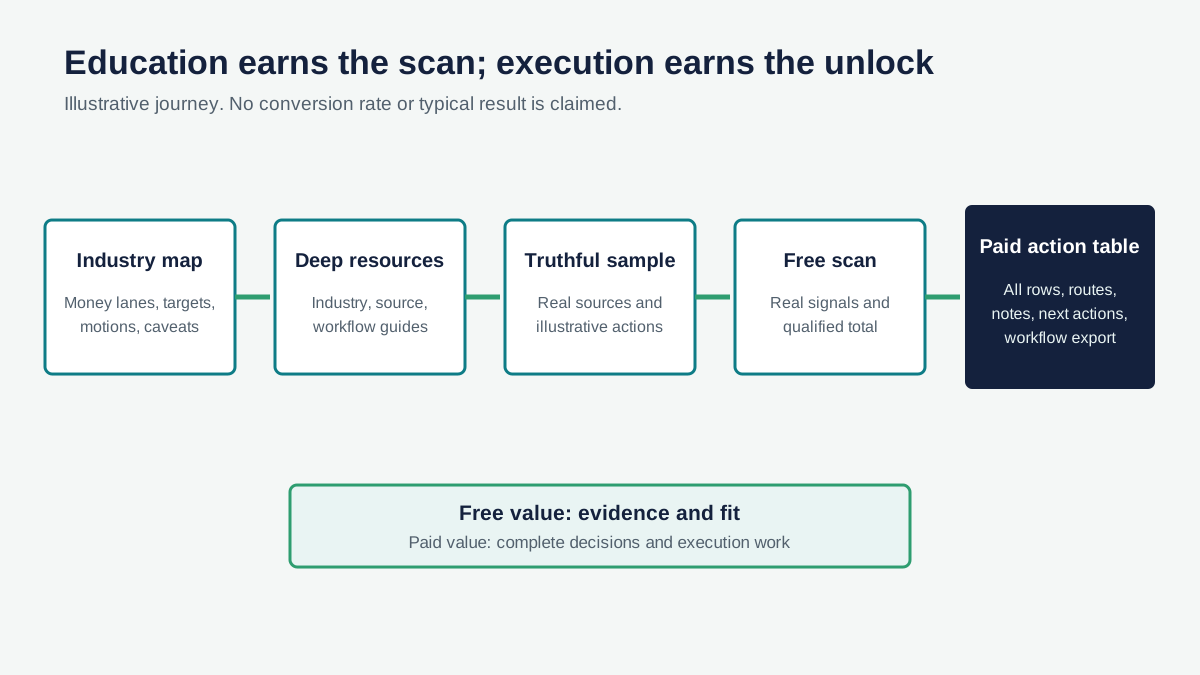
Illustrative industry evidence-to-action path
Industry context helps you recognize the right evidence; a company-specific scan turns that evidence into qualified actions.
Open visual full sizeIllustrative decision path. Actual results depend on company fit and current public records. Source: Illustrative Opportunity Scanner framework informed by official public-source guidance; no outcome is claimed.
Sources cited
Put this into the product
Explore your industry, review a source-backed sample, and run a free scan before deciding whether you need the full action table.
Opportunity Scanner classifies the evidence, opens the official route, and lets you start a pursuit with an owner, fit decision, next step, internal due date, and notes.
Scan Your Company WebsiteKeep exploring
Related reads
Public-Sector Sales
Why Government Spending Is an Overlooked Growth Channel for Businesses
A practical guide to using contracts, awards, grants, recipients, and forecasts as evidence for new public-sector revenue paths.
7 min read
Public-Sector Sales
How to Build a Public-Sector Sales Pipeline Without a GovCon Team
A practical 30-day market test for companies that want to validate public-sector demand before hiring a capture team.
10 min read
Public-Sector Sales
Public-Sector Deal Flow for Commercial Companies
A practical system for turning official public-sector records into qualified commercial deal flow, owned actions, and honest stop decisions.
8 min read