
SAM.gov Is Not Enough: How to Spot Earlier Public-Sector Signals
Use SAM.gov with spending history, grants, recipients, forecasts, policy, and state or local sources to build a more complete opportunity pipeline.
Quick answer
The short answer
SAM.gov is essential for federal procurement, but it is not a complete public-sector growth system. It shows federal contract opportunities and other award-lifecycle information. It does not, by itself, explain historical spending patterns, every funded organization that may buy, grant eligibility, anticipated agency requirements, policy-created demand, or state and local procurement. A company that searches only SAM.gov can miss earlier evidence and indirect routes. A company that treats every SAM.gov result as a bid can also create a noisy, misleading pipeline. The better workflow starts with SAM.gov and connects each source to the action it can actually support.
Key takeaways
- SAM.gov is the core federal opportunity source, but notice type and status determine whether a record supports bidding, early response, monitoring, or research.
- USAspending adds historical buyers and recipients; Grants.gov adds funding and eligibility; forecasts add earlier demand; official state and local portals add nonfederal purchasing.
- More sources should improve classification and actionability, not simply increase result count.
- Every retained record still needs a target, revenue motion, contact path, next action, and source caveat.
Know what SAM.gov does well
SAM.gov is an official government system and is free to use. Anyone can search federal contract opportunities without an account, while an account supports functions such as saved searches and following opportunities. The system also includes entity registration, assistance listings, wage determinations, exclusions, and contract data resources across the federal award lifecycle.
For procurement research, SAM.gov provides the official notice, contracting office, dates, classification codes, place of performance, set-aside information when applicable, attachments, response instructions, and source-native contacts. Those fields make it indispensable when a company is evaluating a current federal requirement.
The main failure is not SAM.gov itself. It is using a keyword search without preserving notice type. A Sources Sought notice, presolicitation, solicitation, award notice, justification, and special notice do not create the same action. FAR 15.201 makes clear that an RFI may be used for planning when the government does not presently intend to award a contract and that responses are not offers.
Add USAspending for buyer and recipient history
SAM.gov can show the current notice; USAspending can show where federal award money has moved. Its data covers contracts and financial assistance, including agencies, recipients, award types, descriptions, locations, and timing. That history can reveal repeat buying offices, incumbent contractors, primes, grantees, health providers, universities, nonprofits, state or local recipients, and other organizations connected to a market.
Historical spending should not be merged into the open-opportunity count. USAspending defines awards, obligations, and outlays with specific meanings. A past award can support Sell to Agency research, an incumbent or channel hypothesis, recipient validation, or a forecast search. It does not prove that an agency has current budget or that a recipient is shopping now.
Use the source to answer: who bought or received, what broad category or purpose was funded, when did it happen, where was performance expected, and does the pattern repeat? Then assign a next action such as checking current notices, reviewing a forecast, researching an incumbent, or validating a recipient's program.
Add Grants.gov and forecasts for money that may move next
Grants.gov covers federal funding opportunities and lets teams distinguish forecasted, posted, closed, and archived records. It also exposes applicant eligibility categories and application instructions. A commercial company may be eligible for some opportunities and ineligible for others. The official notice, not the search result title, controls the Direct Apply decision.
Ineligible grant records can still matter when they point to a class of future funded recipients that may need technology, supplies, staffing, training, services, or implementation partners. Keep that as Research Only or recipient monitoring until an official award names an organization. Do not pre-label likely applicants as funded buyers.
Agency procurement forecasts provide a separate earlier-demand lane. Acquisition.gov maintains links to recurring forecasts and related business resources. A forecast can justify account planning, a capability review, or a scheduled monitoring task before a solicitation appears. It remains a planning signal and may change or disappear.
Add policy and state or local sources selectively
Policy records can reveal demand drivers before procurement language is written. Proposed and final rules, program notices, budgets, capital plans, reimbursement changes, and implementation guidance may affect what agencies or funded organizations need. FederalRegister.gov provides access to official Federal Register documents. Keep policy evidence in Monitor Policy unless a separate funding or procurement source creates a current route.
SAM.gov does not represent the full state and local market. States, cities, counties, school districts, transit agencies, housing authorities, public hospitals, and other entities may publish through their own official procurement or grant portals. Add those sources only when they match the company's geography and buyer set, preserve the native source link, and normalize status and dates conservatively.
The goal is not a universal portal collection. Select sources that change the decision for the target ICP. A healthcare supplier may need state Medicaid, public health, hospital, and local procurement evidence. A creative company may need city cultural affairs, tourism, parks, and school purchasing. A workforce platform may need state labor, workforce board, and education sources.
Run a multi-source workflow without duplicating noise
Start with the company offer, buyer problem, mission terms, codes, geography, and exclusions. Search SAM.gov for current and early federal notices. Use USAspending to validate purchasing and recipient history. Use Grants.gov to identify open or planned funding and applicant classes. Review agency forecasts for anticipated procurement. Add policy or state and local sources only where they materially improve coverage.
Normalize each record into one of six evidence classes: active, historical, forecasted, funded-recipient, policy, or research. Deduplicate by official identifier, organization, source, and underlying event. The same program may appear in a forecast, solicitation, award, and recipient record over time. Preserve that lineage instead of showing four unrelated opportunities.
Then qualify the row. Is the official source current? Does the record fit an existing offer? Who is the target? Which revenue motion is primary? What contact path is allowed and useful? What next action reduces uncertainty? What would disqualify the row? A source should earn its place by improving one of those answers.
Use source-to-action examples carefully
Illustrative example: a medical supplier finds a SAM.gov Sources Sought notice. The target is the named agency office, the motion is Sell to Agency, the contact path is the official notice contact, and the next action is to review specifications and response instructions. The record is market research, not a contract, and no later solicitation or award is assumed.
Illustrative example: an education services company finds no matching active notice but sees repeated USAspending awards and an agency forecast. The initial motion is Research Only or Sell to Agency research, the contact path may be the forecast or small-business office, and the next action is to validate timing and likely procurement route. Historical spending and a forecast do not prove an open purchase.
Illustrative example: a software company finds a posted grant restricted to local governments. The company is not Direct Apply. The motion is recipient monitoring, the contact path is the official program record, and the next action is to monitor verified awards before assessing funded-buyer fit. No applicant should be described as funded before an official award.
Six-source public-sector opportunity workflow
- 1Use SAM.gov for federal notices and preserve exact notice type.
- 2Use USAspending for historical agencies, recipients, incumbents, and award patterns.
- 3Use Grants.gov for funding status, eligibility, and future recipient classes.
- 4Use agency forecasts for anticipated procurement and scheduled monitoring.
- 5Use official policy sources for emerging requirements without calling them purchases.
- 6Use selected official state and local portals for geography-specific demand.
- 7Classify each record as active, historical, forecasted, funded-recipient, policy, or research.
- 8Deduplicate records that describe the same underlying program or acquisition.
- 9Assign target, revenue motion, contact path, next action, owner, and disqualifier.
- 10Reject any source that adds volume without improving a decision.
Charts and visual evidence
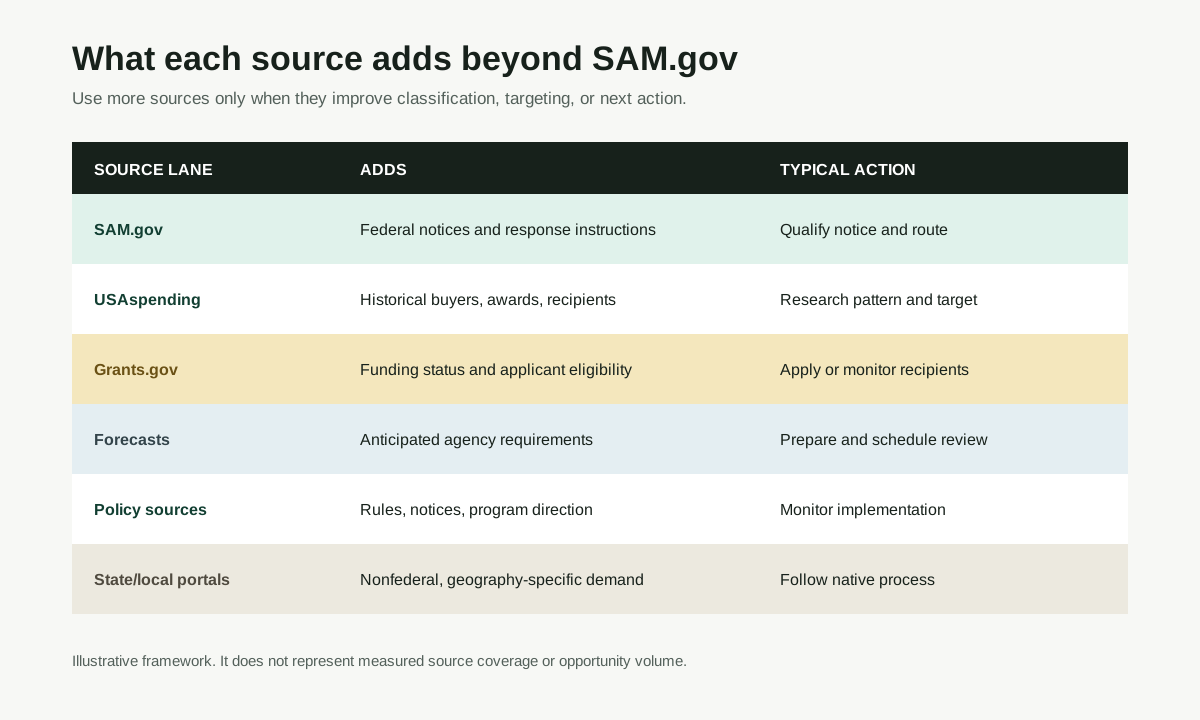
What each public source adds beyond SAM.gov
A complete workflow separates current notices from spending history, funding, forecasts, policy, and state or local demand.
Open visual full sizeIllustrative source framework. It does not represent measured coverage or opportunity volume. Source: Illustrative Opportunity Scanner source framework based on official system documentation
Sources cited
Put this into the product
Run a free scan to combine federal notices with spending, funding, recipient, forecast, and policy evidence in one qualified action table.
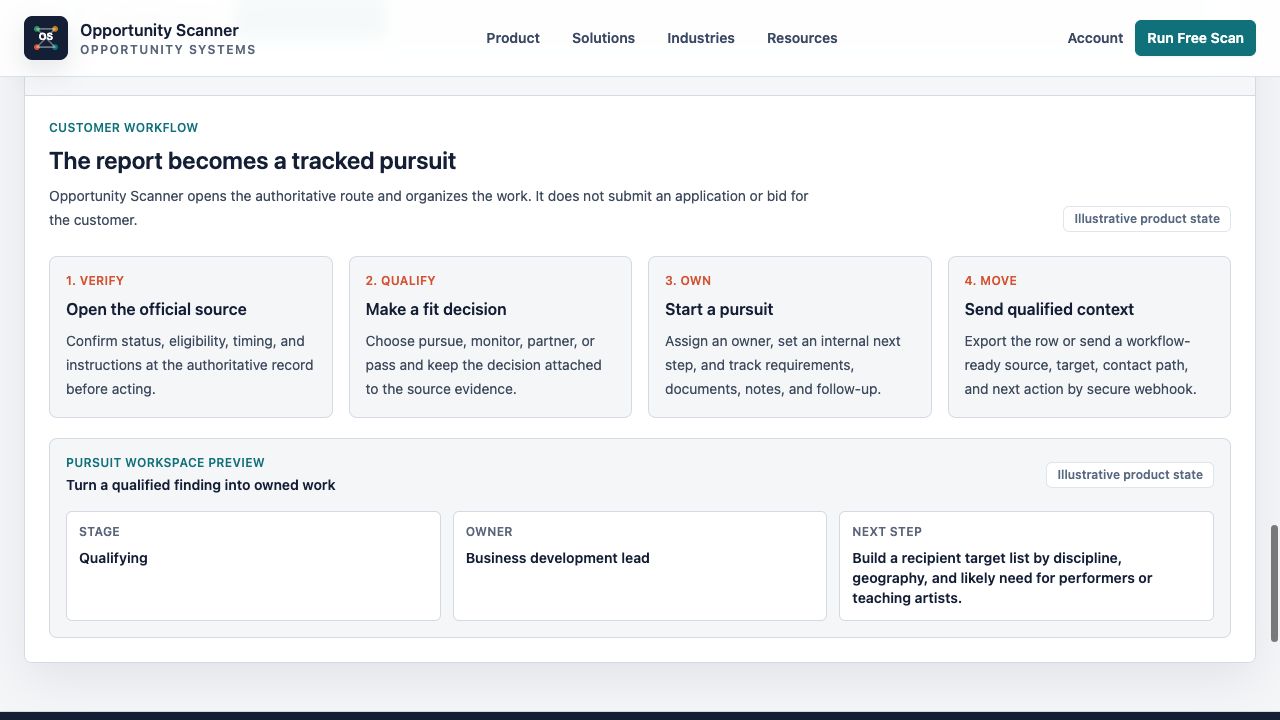
Opportunity Scanner classifies the evidence, opens the official route, and lets you start a pursuit with an owner, fit decision, next step, internal due date, and notes.
Scan Your Company WebsiteKeep exploring
Related reads
Government Contracts
Can My Business Sell to the Government? A Practical First Check
Use this readiness assessment to decide whether direct agency sales, subcontracting, funded buyers, partnerships, or monitoring fit your business.
6 min read
Public-Sector Sales
Why Government Spending Is an Overlooked Growth Channel for Businesses
A practical guide to using contracts, awards, grants, recipients, and forecasts as evidence for new public-sector revenue paths.
7 min read
Opportunity Intelligence
What Is a Public-Sector Opportunity Signal?
Learn how to classify public-sector opportunity signals, reject weak matches, and turn credible evidence into a target and next action.
7 min read